LESCO Bill Online 2026 – Check & Download Duplicate Bill
Access your Lahore Electric Supply Company (LESCO) duplicate electricity bill online using your reference number or customer ID. Instantly view, download, and print LESCO utility bills, billing details, payment status, due dates, and electricity consumption information through official online billing records.
LESCO Bill Check Online 2026: View Your Electricity Bill Instantly
LESCO Bill Checker
Lahore Electric Supply Company
The LESCO Bill Check Online service allows consumers to check their electricity bill without waiting for a physical copy. The Lahore Electric Supply Company (LESCO) provides a free, secure, and easy-to-use online billing system where users can access their latest bill information through official utility data available through PITC Data.
The online bill checker works on both mobile devices and desktops, allowing users to view their LESCO eBill anytime. The information displayed through this service is the official bill record, including important details such as the payable amount, due date, payment information, and consumer details.
How to Check LESCO Bill Online With Reference Number or Customer ID
To check your LESCO bill online, you need either your 14-digit Reference Number or 7-digit Customer ID. The Reference No. is usually mentioned on the top corner of your printed Bijli bill and is linked with your specific consumer connection.
Enter the 14-digit reference number in the LESCO online bill checker and click the Check Bill button. After verification, the system displays your latest LESCO electricity bill along with complete bill details, including payment status, due date, total amount, and consumer information.
If the reference number is unavailable, you can use your Customer ID, also known as consumer ID, which is available near the customer information section of your bill. Enter the required details to access your latest billing record instantly.
The online system also allows consumers to download, print, or save their bill copy for future use. Users can access a duplicate bill, duplicate copy, and previous billing records through the LESCO Bill Duplicate Service.
Consumers can check previous records, including LESCO bill duplicate 2025 and available monthly bill history. The service makes it easier to manage electricity bills without visiting customer service offices.
LESCO is one of Pakistan’s major electricity distribution companies responsible for providing electricity services in Lahore and surrounding regions. Its digital billing system operates under the broader electricity distribution network connected with WAPDA and modern utility management platforms.
Consumers can also pay their bills through different banking apps and online payment channels. Additional information about the LESCO bill calculator, LESCO unit rate, LESCO helpline number, LESCO address, and LESCO bill FPA (Fuel Price Adjustment) can also be accessed for better understanding of electricity charges in 2026.
What is LESCO?
LESCO (Lahore Electric Supply Company) is one of the largest electricity distribution companies in Pakistan, responsible for providing electricity across five districts of Punjab: Lahore, Kasur, Okara, Shaikhupura, and Nankana Sahib. These areas are also sometimes written as Sheikhupura and Nankana in different records, but they refer to the same districts.
The company supplies electricity to millions of consumers, including residential, commercial, industrial, agricultural, urban, and rural users. LESCO operates under the framework of the Water and Power Development Authority (WAPDA) and serves more than 6.4 million customers across an area of approximately 16,000 square kilometers.
LESCO Operations, Network, and Electricity Distribution System
To manage such a large consumer base, LESCO operates an extensive electricity distribution network consisting of 120 grid stations, 2,150 feeders, and more than 48,000 km of transmission and distribution lines. The company is supported by approximately 19,500 employees who handle electricity supply, customer services, billing operations, and network maintenance.
LESCO follows a structured operational system divided into circles, divisions, subdivisions, and grid stations, allowing different departments to manage specific service areas efficiently. As a government-owned public utility and an Electricity Distribution Company (DISCO), LESCO is responsible for electricity distribution, consumer billing, grid maintenance, and ensuring a reliable power supply.
The company also manages tariff implementations, electricity theft control, and consumer billing services through digital platforms such as the PITC Web Bill portal, which allows users to access their electricity bill information online.
It is important to note that LESCO can also refer to an American agronomics and lawn care brand that manufactures fertilizers and weed control products. This brand is unrelated to the Lahore Electric Supply Company, which is Pakistan’s electricity distribution organization.
LESCO Bill Components
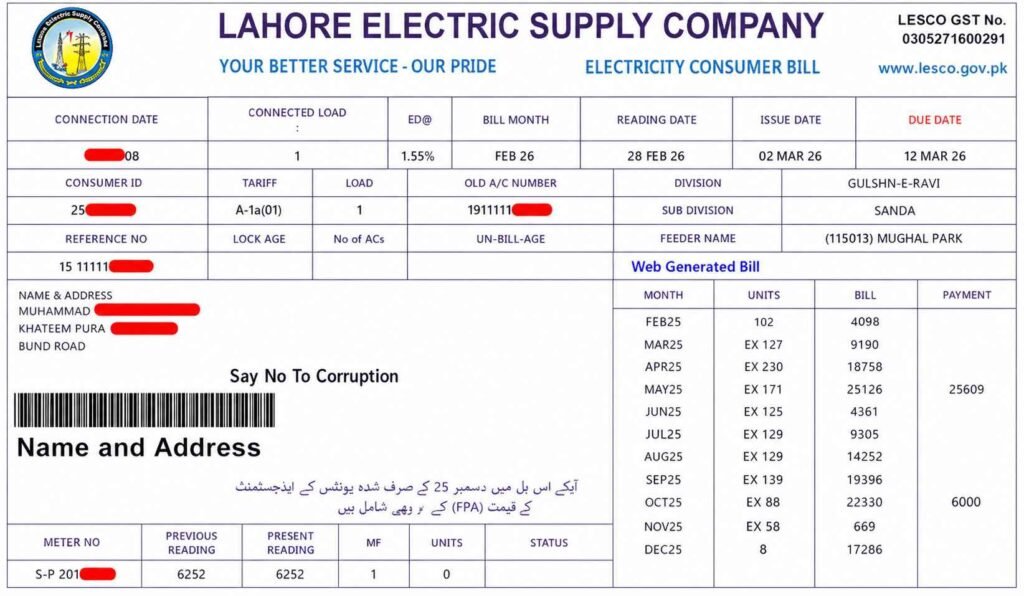
When using LESCO Bill Online 2026 for an online bill check, understanding the different sections of your LESCO bill makes bill verification easier. Every electricity bill contains important consumer information, including account details, specific account details, and details linked with your reference number and consumer ID. This 14-digit identifier helps users access their bill record and complete payment verification before making bill payment through different banking channels. The bill also displays connection details, consumer name, address, tariff type, connection date, and sanctioned load related to the electricity connection. In my experience, checking these details first helps avoid mistakes during account verification and keeps your billing information accurate.
Metering Data and Electricity Consumption Details
The Metering Data section explains your electricity consumption during a specific billing cycle. It shows the actual electricity consumed, billing month, reading dates, current billing period, and meter reading date. Users can compare units consumed, previous meter reading, and current meter reading to understand the electricity units difference and consumption calculation. This part also includes tariff slab, meter information, electricity usage, monthly consumption, and meter record, which help customers track their regular power use. Reviewing this information through an LESCO bill record can make it easier to identify changes in consumption patterns.
Billing History and Charges Breakdown
The Billing History Table provides a 12-Month Overview of your monthly bill history, electricity consumption history, consumed units, billed amounts, and payment records. This past year record helps users study consumption trends, billing trends, and overall electricity usage tracking. The bill history, payment history, and annual overview create a clear unit consumption record and complete account history. The Charges Breakdown section shows the total amount due, electricity charges, electricity cost, base cost, and electricity units consumed according to the applicable tariff slab. It also includes fixed charges, monthly connection maintenance charges, connection charges, Fuel Price Adjustment, FPA, Quarterly Tariff Adjustments, QTR, and other variable charges related to fuel costs and power generation.
Taxes and Additional Electricity Billing Components
The final part of your bill contains government taxes, surcharges, and other additional components mentioned under LESCO Bill PK Laws. These may include General Sales Tax, GST, federal government tax, 17 percent tax, Electricity Duty, and provincial government levy with a 1.5 percent charge. Customers may also see income tax, slab thresholds, TV Fee, Rs. 35 television fee, F.C. Surcharge, and Neelum Jhelum Surcharge or N.J Surcharge used for national funding. Other adjustments can include further tax, extra tax, differences based on filer status and non-filer status, especially for commercial connections. Understanding these tariff adjustments, government deductions, and complete electricity billing components helps users read their LESCO bill more confidently.
LESCO Tariff
Consumer Categories and Electricity Rates
LESCO tariff depends on the type of consumer, electricity usage, and the applicable slab. Every unit of electricity consumed has a specific cost, but the amount charged varies for different categories such as domestic consumers, commercial users, industrial users, and agricultural consumers.
Domestic consumers are further divided into different categories according to their monthly electricity consumption. This classification helps determine whether a user qualifies for subsidized rates or falls under standard tariff rates.
The lowest category includes lifeline users, who consume up to 100 units during 12 consecutive months and receive lower electricity rates. Consumers with moderate usage may fall under the protected users category, where the government provides a subsidy to reduce the overall electricity cost. Users who exceed the protected limit are classified as un-protected users and are charged higher per-unit rates.
Agricultural consumers follow a different tariff structure based on sanctioned load rather than a simple unit-based slab. In all categories, electricity charges can also vary depending on whether consumption occurs during peak hours or off-peak hours.
Peak and Off-Peak Hours in LESCO Tariff
Peak hours are the periods when electricity demand is highest across the grid, which results in higher electricity rates compared to off-peak hours. LESCO applies different rates during these time periods to manage electricity demand and encourage consumers to shift heavy appliance usage to lower-cost hours.
Peak and off-peak timings are not the same throughout the year and may change according to seasonal requirements. The schedule is divided into different periods, including:
- December to February
- March to May
- June to August
- September to November
Using electricity-intensive appliances during off-peak hours can help consumers reduce their monthly electricity bills, especially when their tariff category has higher per-unit rates.
Un-Protected Users and Higher Tariff Slabs
Consumers who consistently exceed the protected user limit are classified as un-protected users. Unlike protected consumers, they do not receive subsidized rates, and the electricity cost increases as consumption rises.
The tariff slabs for un-protected users are:
- 1–100 units: Rs. 20.85 per unit
- 101–200 units: Rs. 27.32 per unit
- 201–300 units: Rs. 31.51 per unit
- 301–400 units: Rs. 38.41 per unit
- 401–500 units: Rs. 41.62 per unit
- 501–600 units: Rs. 43.04 per unit
- 601–700 units: Rs. 44.18 per unit
- Above 701 units: Rs. 49.10 per unit
For un-protected users, the timing of electricity usage also affects the final bill. The peak hours rate is Rs. 48.27 per unit, while the off-peak hours rate is Rs. 41.95 per unit, making energy usage timing an important factor in controlling electricity costs.
Protected Users and Subsidized Electricity Rates
Protected users are consumers who receive relief through a subsidized electricity tariff based on their usage pattern. Consumers using up to 200 units per month for 6 consecutive months are classified under this category.
This classification allows eligible users to pay lower electricity rates compared to standard tariff rates. The protected user slabs are divided as follows:
- 0–50 units: Rs. 3.95 per unit
- 51–100 units: Rs. 7.74 per unit
- 1–100 units: Rs. 12.21 per unit
- 101–200 units: Rs. 14.53 per unit
The slab system means that electricity bills can differ between consumers even if they live in the same area, as the final amount depends on total units consumed and the applicable tariff category.
Areas Covered by LESCO
LESCO (Lahore Electric Supply Company) does not only provide electricity to Lahore city; its service network extends across multiple districts of Punjab province, Pakistan. The company manages electricity distribution for both urban areas and rural areas, covering a wide operational region that includes major cities, towns, and surrounding villages.
The areas under LESCO are divided into five main civil districts. These districts are connected through LESCO’s distribution network, and consumers from these regions can use the LESCO portal to check their electricity bills, view connection details, and access online billing services.
| District Covered by LESCO | Coverage Details |
|---|
| Lahore | The main urban center with a large number of residential, commercial, and industrial electricity consumers |
| Sheikhupura | Covers urban areas, towns, and surrounding rural regions under LESCO’s distribution network |
| Kasur | Includes residential and agricultural areas receiving electricity supply through LESCO |
| Nankana Sahib | Covers city areas as well as nearby rural communities connected with LESCO services |
| Okara | Includes urban settlements and agricultural regions within the LESCO operational area |
these districts form the complete LESCO service area, where the company manages electricity supply, billing operations, and consumer services.
Operation Circles of LESCO
To manage such a large distribution network efficiently, LESCO divides its service area into different operation circles. These circles help organize electricity supply, maintenance work, complaint handling, and consumer services across different regions.
The major operation circles of LESCO include:
| LESCO Operation Circles | Main Areas Covered |
| Lahore Circle | Different parts of Lahore city and surrounding areas |
| Sheikhupura Circle | Sheikhupura district and nearby regions |
| Kasur Circle | Kasur district and connected areas |
| Nankana Sahib Circle | Nankana Sahib district and surrounding locations |
| Okara Circle | Okara district and nearby rural and urban areas |
These operation circles allow LESCO to manage electricity distribution more effectively across its entire network. Whether a consumer belongs to a major city area or a smaller rural location, their electricity connection remains connected with the same LESCO billing and service system.
When checking a LESCO bill online, the consumer information, billing details, and connection records are linked with the specific area and operational circle under which the electricity connection is registered.
Taxes and Surcharges Included in Your LESCO Bill
A LESCO bill includes different types of government taxes, adjustments, and surcharges that increase the final payable amount. These charges are applied according to government policies and regulations set by authorities like NEPRA and are not controlled by LESCO itself.
Understanding these components helps you identify why your electricity bill amount changes every month and what each charge means.
Common Taxes and Charges Added to a LESCO Electricity Bill
Electricity Duty
Electricity Duty is a government-imposed charge applied at a fixed rate of 1.5% on electricity consumption.
GST
(General Sales Tax)
GST, also known as General Sales Tax, is added at a rate of 17% on applicable electricity charges. Some older bills may display it as General Sales Taxes.
FPA
(Fuel Price Adjustment)
Fuel Price Adjustment (FPA) is a variable charge that changes according to fluctuations in fuel prices used for electricity generation. When fuel costs increase or decrease, the difference is adjusted in consumer bills.
The FPA calculation is determined by NEPRA, while LESCO only applies the approved adjustment to consumer bills.
FC Surcharge
(Financial Cost Surcharge)
The FC Surcharge, also written as F.C Surcharge or F.C. Surcharge, stands for Financing Cost Surcharge. It is collected to support debt servicing obligations related to Power Holding Private Limited.
This surcharge is charged at approximately 43 paisa per unit (Rs. 0.43).
QTA
(Quarterly Tariff Adjustment)
Quarterly Tariff Adjustment (QTA) is a periodic adjustment applied after every three months to recover changes in electricity costs.
T.R. Surcharge
(Tariff Rationalization Surcharge)
The Tariff Rationalization Surcharge (T.R. Surcharge) manages the tariff difference between NEPRA and the Government of Pakistan (GOP).
- If the difference is positive, it is paid by GOP as a subsidy.
- If the difference is negative, the distribution company pays it under the Inter DISCO Tariff Rationalization Surcharge.
Government Taxes and Additional Charges on LESCO Bills
Apart from electricity-related adjustments, LESCO bills may also include different government taxes and fixed charges, such as:
- Advance Tax / Income Tax / Withholding Tax:
An 18% Advance Tax may apply according to taxpayer status and billing conditions. For non-filers, tax can be applied at 7.5% when the monthly electricity bill exceeds Rs. 25,000.
- TV Fee (PTV Fee):
A fixed Rs. 35 TV Fee is added to domestic electricity bills. It is a mandatory government fee charged per domestic meter regardless of electricity usage.
- Provincial Electricity Duty:
This is a provincial government charge applied to electricity costs for domestic consumers.
- GST on Surcharges:
Some surcharges may also include fractional GST charges, which can increase the overall bill amount.
How to Remove Incorrect Taxes From Your LESCO Bill
If additional tax is appearing on your LESCO bill, the first step is to check your Tax Filer Status.
Active taxpayers registered with the Federal Board of Revenue (FBR) should ensure that their details are correctly updated to avoid unnecessary tax deductions.
To update your records:
- Make sure your CNIC details are correct.
- Confirm that your mobile number is linked with your CNIC.
- Ensure your information is updated with your LESCO Reference Number.
In some cases, tax-related issues occur because of outdated records, rented properties, or ownership details. Consumers may need to visit the relevant LESCO SDO office or update information through the property owner’s FBR profile, depending on the situation.
LESCO Bill Payment Methods: Complete Guide to Pay Your Electricity Bill
Paying a LESCO bill has become easier with multiple online and offline payment options available for customers. Instead of relying on only traditional payment methods, consumers can now use digital platforms, banking services, and official channels according to their convenience.
LESCO provides different payment methods, including Commercial Banks, ATM payments, Mobile Wallets, QR Code Payment, Power Smart App, RAAST Payment, Post Offices, and Service Centres. If any payment-related problem occurs, customers can also use the LESCO Complaints system to register and track their issues.
Online and Offline Ways to Pay Your LESCO Bill
Mobile Banking Apps
Mobile Banking Apps are one of the most convenient ways to pay your LESCO electricity bill online. Many major banks offer utility bill payment facilities through their official applications, including:
- Meezan Bank
- United Bank Limited (UBL)
- National Bank of Pakistan
- Standard Chartered Bank
To pay through a banking app, open your mobile banking application, select the bill payment option, enter your LESCO Reference Number, verify the bill details, and confirm the payment.
Mobile Wallets
Mobile wallets allow customers to pay electricity bills directly through their smartphones. Popular options include EasyPaisa, JazzCash, UPaisa, SadaPay, and NayaPay.
The payment process usually includes:
- Open your mobile wallet app.
- Select bill payment.
- Choose LESCO as the service provider.
- Enter your reference number.
- Confirm payment.
QR Code Payment
QR Code Payment is another quick digital method available for LESCO bill payments. Customers can scan the QR Code printed on their electricity bill through a supported banking or payment app.
After scanning:
- Verify the bill information.
- Select the Pay Bill option.
- Confirm the transaction.
- Receive payment confirmation through SMS.
Commercial Banks:
Commercial Banks and registered bank branches allow customers to pay LESCO bills through traditional banking channels.
Available payment options may include:
- Cash payments.
- Bank drafts.
- Debit cards.
- Credit cards.
After successful payment, customers receive a confirmation receipt as proof of transaction.
RAAST Payment
RAAST Payment is Pakistan’s instant digital payment system that allows users to pay bills through supported banking applications.
Customers can complete payment by:
- Opening their digital banking app.
- Selecting RAAST Payments.
- Choosing bill payment.
- Scanning the QR Code or entering the LESCO Reference Number.
- Verifying details and completing payment.
RAAST provides fast digital transactions without additional payment charges.
Power Smart App
The Power Smart App is designed to provide electricity customers with easier access to different services. Through this app, users can check their bills and make payments instantly.
Main features include:
- Viewing electricity bills.
- Paying bills online.
- Accessing electricity-related services.
- Managing account information.
ATM Bill Payment
Customers can also pay their LESCO bills through ATMs that support utility bill payments.
The process includes:
- Insert your ATM card.
- Select the Bill Payment option.
- Choose LESCO.
- Enter required information.
- Confirm payment.
ATM payments are available 24/7 and provide a secure option for customers who prefer banking machines.
Post Offices and Service Centres
Customers who prefer offline payment methods can pay their bills through Post Offices and LESCO Service Centres.
These centres provide:
- Bill payment facilities.
- Payment receipts.
- Assistance with basic customer queries.
Is It Safe to Pay LESCO Bill Through Credit Card?
Paying a LESCO bill through a credit card is generally safe when using authorized banking apps or secure payment platforms.
Before entering credit card details, always check:
- The website has HTTPS/SSL encryption.
- A lock icon appears in the browser address bar.
- The payment platform belongs to an authorized bank or service provider.
Official banking applications and trusted payment services use secure systems to protect personal and financial information.
Benefits of Checking LESCO Bill Online
Checking a LESCO Bill Online is one of the easiest ways to access your electricity bill without visiting a customer service office. The online billing system allows consumers to view their bill anytime by entering a valid reference number or customer ID. Since the service is free of cost, users can check, download, or print their bill whenever needed.
Why Use the LESCO Online Billing System?
The online billing system offers several advantages that make bill management faster and more convenient.
- Access your bill anytime using your reference number or customer ID.
- Check your bill from anywhere with an internet connection.
- View your bill before receiving the printed copy.
- Download or print a duplicate bill at no additional cost.
- Get enough time to arrange payment before the due date.
- Use a user-friendly interface that is easy for all consumers.
- Access the service on desktop, tablet, or mobile friendly devices.
Key Benefits of Checking Bills Online
The main Benefits of Checking Bills Online include convenience, speed, and accessibility. Since the service is available 24/7, consumers can check their electricity bill whenever required without depending on office hours. Bill checking takes only a few seconds, making it a quick solution for regular users.
Another major advantage is instant access to a duplicate bill whenever the original copy is lost or delayed. Because the service is completely free, consumers can repeatedly check, download, or print their bill without paying any extra charges. Overall, the Benefits of Checking LESCO Bill Online include time savings, easier bill management, better payment planning before the due date, and a reliable mobile friendly experience for every consumer.
Common Issues While Checking LESCO Bill Online
While checking a LESCO Bill Online, users may occasionally face temporary issues related to the reference number, PITC Web Bill portal, internet connectivity, or the monthly billing cycle. Most of these problems can be resolved by following a few simple troubleshooting steps.
Common Problems and Their Solutions
Invalid Reference Number
An Invalid Reference Number error usually occurs because of:
- Missing digits in the 14-digit reference number.
- Extra spaces while entering the number.
- Using an old reference ID after net-metering or subdivision updates.
Solution
- Verify the 14-digit reference number printed on the top corner of your physical bill.
- Remove any extra spaces before submitting.
- Make sure the correct and updated reference number is entered.
Bill Not Loading on the portal
If the bill does not load, the most common reasons include:
- High server traffic on the PITC Web Bill portal.
- An unstable internet connection.
- Browser cache issues.
Solution
- Refresh the page and try again.
- Use Ctrl + F5 for a hard refresh on desktop.
- Clear your browser cache.
- Retry during non-peak hours when server traffic is lower.
Incorrect Bill Details
Incorrect bill information may result from:
- Incorrect meter readings.
- Estimated billing.
- Recent tariff adjustments that have not yet synchronized.
Solution
- Compare the online bill with your previous bill copy.
- Verify the consumption history and meter numbers.
- Record the actual meter reading with a photo or video if required.
- Visit your nearest LESCO Sub-Division office to request a correction.
Latest Bill Not Showing
A missing latest bill is generally caused by:
- Delays in the monthly billing cycle.
- Temporary system synchronization delays.
Solution
- Wait until your regular billing generation date.
- Check the portal again after a few hours or within one to two days.
- Verify the bill through alternative financial platforms if immediate confirmation is required.
Payment Confusion
Payment-related issues usually occur because of:
- Bank clearance delays.
- Failed digital transactions.
- Outstanding status not updating immediately after payment.
Solution
- Verify the payable amount and due date before making payment.
- If the payment status remains incorrect, contact LESCO’s support helpline (111-000-118).
- If necessary, pay through designated bank branches or franchises to avoid late payment penalties while the issue is being resolved.
How to Get a LESCO New Connection
Step-by-Step LESCO New Connection Application Process
Getting a LESCO new connection is a straightforward process. Lahore Electric Supply Company (LESCO) allows applicants to begin the procedure online through the ENC portal, while document verification and meter installation are completed through the relevant LESCO subdivision or Customer Facilitation Center.
Follow these steps to apply successfully:
Step 1: Register Through the ENC Portal
Start by visiting the official ENC portal and selecting New Connection.
Complete the online application by providing:
- Applicant’s CNIC details
- Required load (for example, Domestic / 2 kW)
- Other required application details
- Property information
After submitting the application, print the completed application form for the next stage.
Step 2: Prepare the Required Documents
Attach the printed application form along with the following documents:
- Attested copy of the applicant’s CNIC
- Attested property ownership document or registry
- Copy of the witness’s CNIC
- Copy of a neighbor’s LESCO electricity bill
- Wiring contractor’s test report (maximum 300 KB if uploaded online)
Ensuring all documents are complete helps avoid unnecessary delays during verification.
Step 3: Submit the Application File
Submit the complete application file, including the printed form and all supporting documents, to your relevant LESCO subdivision or Customer Facilitation Center.
LESCO will verify the submitted information and documents before processing the application.
Step 4: Receive and Pay the Demand Notice
After successful verification, LESCO issues a demand notice.
Pay the required amount at the designated bank branch. According to the current revised fee structure, the standard fee for a single-phase meter connection is Rs. 21,300, which includes:
- Rs. 17,700 for the meter and cable
- Rs. 3,600 as security charges
Step 5: Submit the Paid Demand Notice
Once payment has been made, submit the paid demand notice receipt to your concerned LESCO office.
After payment verification, Lahore Electric Supply Company (LESCO) will proceed with the installation of your new electricity meter.
Important Note
The official ENC portal can also be used for other electricity connection services besides applying for a brand-new connection. Users can submit requests to:
- Change the connection name
- Change the tariff
- Change the electricity load
Simply open the official website, select New Connection, access the ENC portal, complete the application form, provide the required information, submit the necessary documents, and follow the remaining procedure until your LESCO new connection is approved and installed.
LESCO Bill History and Previous Bills
How to View Previous LESCO Utility Bills
you need to access previous bills or your LESCO bill history, there are several official and alternative methods available. While some platforms only display the latest bill, others provide access to billing history, payment records, and previous months’ statements.
You can use the following options:
- PITC Web Bill Service – The most reliable official platform to view past utility bills, billing history, and previous months’ statements.
- myABL – Banking apps such as myABL may keep your bill payment history and transaction records.
- PTCL Bill Inquiry – Useful for checking previous landline and internet utility bills.
- GEPCO Old Bill Check – An alternative platform that may help retrieve older web bills through unofficial databases when official portals have limited history.
Check Bill History on Your LESCO Electricity Bill
Your LESCO electricity bill already contains a dedicated bill history section.
This section is usually located on the right side of the bill and includes details for previous months in four columns:
- Month
- Units
- Bills
- ADJ (Adjustments)
The Payment column appears alongside these details, allowing you to compare the billed amount with the payment made for each month. If you are viewing your bill online or using a printed bill copy, this section provides a quick overview of your recent billing record.
View Consumption and Account Status
As one of the leading DISCOs in Pakistan, LESCO provides several online services beyond downloading the latest electricity bill.
Using your reference number or customer ID, you can access:
- Consumption history
- Payment history
- Previous 12 months’ billing history
- Monthly consumed units
- Bill amount for each month
- Complete account status
The account status section typically includes:
- Consumer name
- Address
- Billing month
- Meter reading date
- Bill issue date
- Due date
- Amount payable before the due date
- Amount payable after the due date
- Current month’s payment details
These online services are available free of cost and are designed to improve the consumer experience by providing easy access to important billing information.
Important Information
To check your LESCO bill history, previous bills, or account status, you must use either your reference number or customer ID.
A CNIC alone cannot be used to retrieve a LESCO electricity bill or its billing history.
Check LESCO Shutdown Schedule by Reference Number
How to Find Your LESCO Shutdown Schedule
Lahore Electric Supply Company (LESCO) provides an official way to check planned power outages through the PITC Load Management Portal. The shutdown schedule is integrated with the Customer Complaint Management System, allowing consumers to view verified information directly from the electricity grid instead of relying on unofficial sources.
To check the LESCO shutdown schedule, follow these steps:
- Open the PITC Load Management Portal.
- Keep your latest LESCO electricity bill ready.
- Locate the 14-digit reference number printed on the bill.
- Select the Find by Reference option.
- Enter your reference number and proceed.
- The system will identify your grid station and feeder.
- Review the available shutdown schedule for your area.
What Information Does the Shutdown Schedule Show?
Once your feeder is identified, the portal displays the scheduled electricity interruption details, including:
- Scheduled maintenance shutdowns
- Repair work
- Temporary load management
- Planned power outage timings
- Grid station and feeder information
This information helps consumers prepare for planned electricity interruptions and manage household activities or business operations more efficiently while minimizing the inconvenience caused by scheduled outages.Using the official PITC Load Management Portal with your reference number ensures you receive accurate LESCO shutdown schedule information directly from the Customer Complaint Management System, making it the most reliable method for checking planned power outages in your area.
Download Duplicate LESCO Bill (PDF)
If your original electricity bill is lost or misplaced, you can easily download a duplicate LESCO bill (PDF) through LESCO E-Bill Check or the PITC Web Bill Portal. These official platforms allow consumers to access their latest or previous LESCO bill online without visiting a LESCO office. As long as you have your Reference Number or Customer ID, you can retrieve your bill within seconds.
How to View and Download Your Duplicate Bill
Before accessing your bill, keep an old bill copy or any recent bill available so you can find your 14-digit Reference Number or 7-digit Customer ID (Unique Consumer Identification Number). These details are required to search and retrieve your electricity bill. If you are unable to locate them, check the upper-left section of your previous bill, where both numbers are normally printed.
Next, open the official PITC LESCO Bill Viewer and enter your 14-digit Reference Number or 7-digit Customer ID in the Input Details field. Click Submit or Search, then select View Bill to display your bill details. This Access the Portal process is completely free and works on both Mobile/PC devices, allowing you to check online and view your latest bill at any time.
Print or Save Your LESCO Bill as a PDF
After your bill appears on the screen, select the Print Bill option or press Ctrl + P (CTRL+P on Windows) to open the print window. If you need a physical copy, make sure your connected printer is ready and click the blue Print button to print the bill.
To keep a digital copy, change the print destination to Save as PDF, then click the blue Save button located in the bottom right corner of the print window. Your download bill will be saved as a PDF, giving you a duplicate copy that can be viewed, printed, or shared whenever needed.
Smart Ways to Reduce Your LESCO Bill
Reducing your LESCO bill does not always require major changes. Using energy-efficient appliances, improving lighting and insulation, and managing electricity usage during peak hours can significantly lower your monthly electricity costs. A combination of smart appliance upgrades and better daily habits helps reduce overall power consumption without affecting comfort.
art Appliance Operation, Lighting, and Home Insulation
Replacing old energy-inefficient appliances with energy-efficient models is one of the most effective ways to lower electricity consumption. Upgrading from traditional appliances to inverter technology, including non-inverter ACs and conventional fans, can reduce power consumption by up to 70%. Similarly, replacing traditional incandescent bulbs with low-wattage (7–12W) LED lights reduces electricity usage while providing better lighting.
To improve AC usage, set the thermostat to an efficient temperature, enable energy-saving modes, and perform regular maintenance. Refrigerator efficiency can also be improved by defrosting older units, using non-frost inverter models, and keeping refrigerator doors closed whenever possible. In addition, unplugging televisions, phone chargers, and other electronic devices when they are not in use helps eliminate phantom power caused by standby electricity consumption.
Natural lighting and proper insulation also play an important role in reducing cooling costs. Open curtains during the day to maximize daylight, use thick curtains or green shades to block direct sunlight, and apply white plaster or paint (Chunna) on rooftops to reflect heat and reduce the cooling load on air conditioners during hot summer months.
Peak Hours, Load Management, and Energy-Saving Habits
Managing electricity usage during peak hours is another effective way to control your LESCO bill. Avoid operating high-consumption appliances such as water pumps, washing machines, irons, and similar equipment between 6:00 PM and 10:00 PM, when electricity demand is highest.
For commercial and high-load users, maintaining a good power factor, keeping the electrical load below 10kW, and avoiding Low Power Factor (LPF) penalties can reduce unnecessary charges. Regular inspection of motors and inverter windings also helps maintain energy efficiency.
Keeping electricity consumption within the Government’s protected category or subsidized slab allows eligible consumers to benefit from lower electricity rates. Simple daily habits can further reduce consumption, including:
- Switch off lights and appliances when they are not in use.
- Unplug TVs, ACs, microwaves, and other devices instead of leaving them on standby.
- Set the air conditioner to 26°C for improved energy efficiency.
- Use electricity carefully during peak hours to avoid unnecessary consumption.
Reduce Your LESCO Bill with a TOU/TOD Meter
One of the most effective long-term upgrades is installing a TOU/TOD electricity meter. Unlike a standard meter, a TOU/TOD Meter applies different electricity rates based on the time of day. During off-peak hours, electricity rates are generally lower because overall demand is reduced.
By shifting energy-heavy activities such as running the washing machine, doing laundry, or charging electric vehicles to off-peak hours, consumers can benefit from lower rates and significantly reduce their monthly electricity bills. Combining a TOU/TOD Meter with LED lighting, energy-efficient appliances, and responsible electricity usage provides greater long-term savings.
Additional Tips to Lower Utility Costs
A few simple changes can make a noticeable difference in every billing cycle:
- Replace traditional bulbs with LED lights.Turn off bulbs and electrical appliances before leaving a room.
- Use high-quality electrical cables to minimize power loss.
- Open windows during daylight to maximize natural light and reduce reliance on artificial lighting.
- Verify your meter readings regularly and compare them with the reading printed on your electricity bill to ensure billing accuracy.
- If suitable for your property, evaluate the feasibility of installing solar power to reduce dependence on the conventional electricity grid and lower long-term utility costs.
LESCO Bill Due Date Extension and Installment Facility
If you are unable to pay your LESCO bill before the due date or need to confirm whether your payment has been received, several official options are available. You can quickly check your electricity bill status through the Easypaisa application, while customers who require extra time can apply for a due date extension or bill installments, subject to LESCO’s terms and approval.
Who Can Approve a Due Date Extension or Bill Installments?
A due date extension must be requested on or before the bill’s due date. This facility is generally available once per year per customer, and the approving authority depends on the total bill amount.
Due Date Extension Approval Authority
- SDO, AM(O), RO, or AM(CS): Up to 3 days for bills up to Rs. 50,000.
- XEN or DM(O): Up to 3 days for higher bill amounts within their approval limits.
- SE or Manager (O): Up to 5 days for bills up to Rs. 500,000.
- Director Commercial / CSD Office: Approval for larger bill amounts as per LESCO policy.
- CEO: Can approve extensions for bills up to Rs. 20 Million.
Monthly Bill Installments
The number of approved bill installments also depends on the payable amount.
- Up to 3 installments for bills around Rs. 50,000.
- Higher bill amounts may qualify for additional installments.
- Large bills, up to Rs. 20 Million, may receive approval for up to 12 installments, depending on the competent authority.
Important Information About Due Date Extensions
General due date extensions are issued only when LESCO management or the Government announces special relief, such as during floods, severe weather conditions, or other emergencies. In normal circumstances, customers are expected to pay their bills within the standard due date printed on the bill.
If your original bill is lost or delivered late, you can use the LESCO Bill Online, LESCO Duplicate Bill, or Online Bills LESCO portal to download a fresh copy. Simply enter your 14-digit Reference Number to access the latest bill, updated due date, and complete billing details without visiting a customer service office.
Payment Status and Available Payment Channels
After making a payment, you can verify your electricity bill status through the Easypaisa application or other supported payment platforms. Customers can conveniently pay their LESCO bill using multiple official Payment Channels, including:
- myABL Mobile Banking App
- NADRA
- OneLink
- Other supported banking and digital payment services
Check LESCO Bill by CNIC
Many consumers want to check their LESCO bill by CNIC, but there is no direct method to retrieve a bill using only a CNIC number. The LESCO billing system is designed to search bills through the 14-digit Reference Number or Customer ID. However, you can use your CNIC to retrieve your Reference Number first and then check your electricity bill online.
How to Find Your Reference Number Using CNIC
To retrieve your Reference Number, open the CCMS website, select the CNIC option from the drop-down menu, enter your CNIC number, and click the Search button. The system will display the Reference Number linked to your electricity connection. Once you have the Reference Number, you can use it to check your LESCO bill, view the latest bill details, or download a duplicate copy through the available online bill portals.
If you already have an old electricity bill, you can also find the 14-digit Reference Number or Customer ID printed at the top-left corner of the bill. These details can be used to access your current bill without using the CNIC search option.
Alternative Ways to Access Your LESCO Bill
If you cannot retrieve your bill through the CNIC search process, you can use any of the following methods:
- Find the Reference Number or Customer ID from a previous electricity bill.
- Use trusted Online Portals, such as Online Bills Pakistan, to view or download a duplicate bill.
- Contact the LESCO Helpline by calling 118 or 042-99205461 to request your bill details using your registered connection information.
Update Your CNIC Information
If the CNIC linked to your electricity connection is outdated or needs correction, you can update it through the LESCO CNIC Verification Portal. Enter your Reference Number to begin the verification process and update your registered CNIC information for future billing and account services.